Fix yt-dlp HTTP Error 403: Forbidden (2026)
Hit 'ERROR: unable to download video data: HTTP Error 403: Forbidden' in yt-dlp? Here are the 4 proven fixes: update, install FFmpeg, switch player clients, and pass browser cookies.

30-Second Key Takeaways
TL;DRQuick digest before you dive deep
If you've run yt-dlp on a YouTube URL and hit this wall:
ERROR: unable to download video data: HTTP Error 403: Forbidden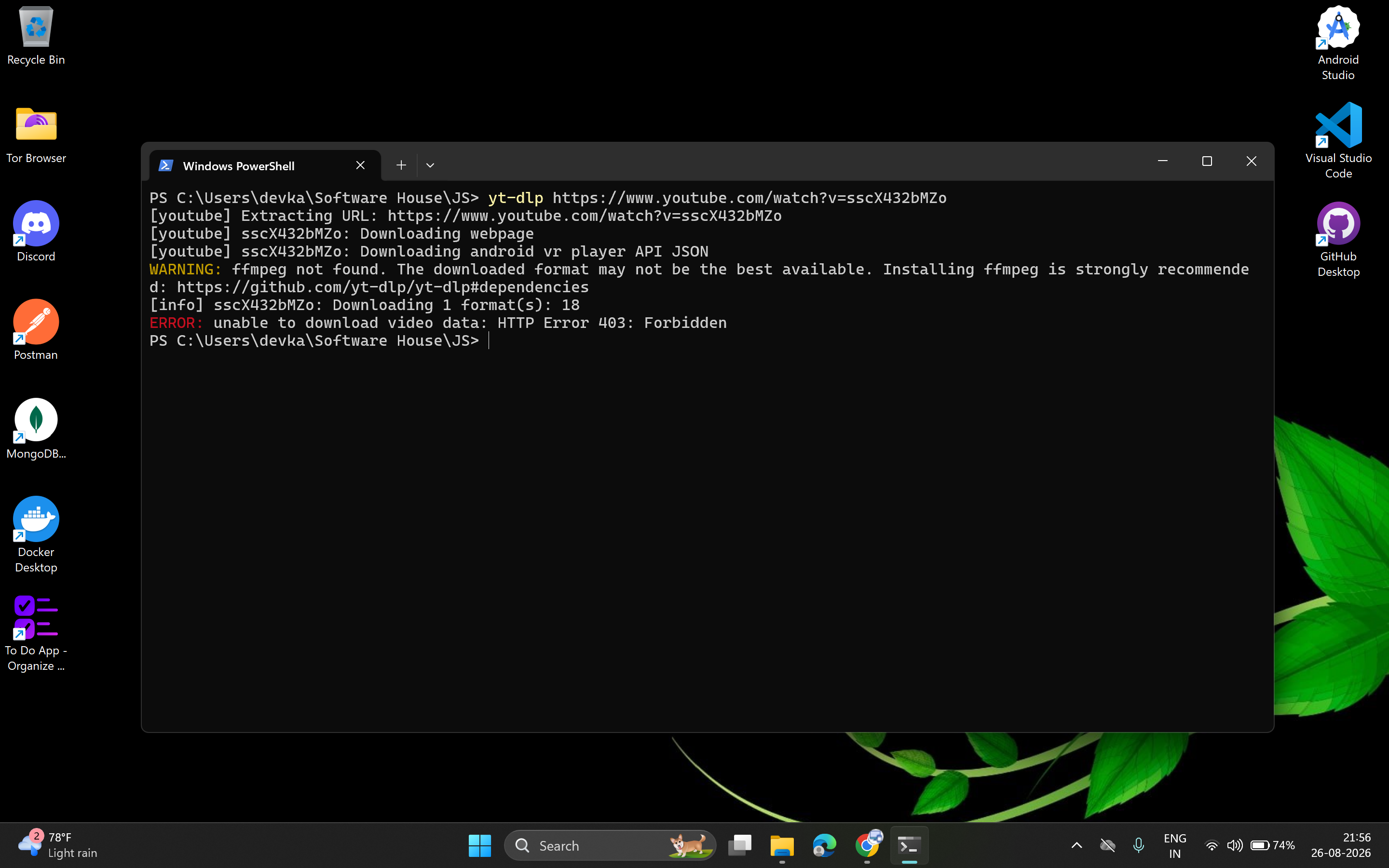
HTTP Error 403: Forbidden download failure....you're not alone. This is one of the single most common yt-dlp errors in 2026, and it almost always comes down to one of three things:
- 1An outdated yt-dlp version missing the latest YouTube player signature patches.
- 2A missing FFmpeg install, forcing yt-dlp into throttled pre-muxed legacy formats.
- 3YouTube rejecting the default extraction client (web client) yt-dlp is using.
Here's exactly why it happens and the step-by-step blueprint to fix it immediately.
This guide is for educational purposes only. yt-dlp is an open-source tool intended for downloading content you own, have permission to download, or that is otherwise legally permitted (your own uploads, public domain content, or explicitly licensed content). Downloading copyrighted material without permission may violate YouTube's Terms of Service and copyright law. Use responsibly.
Video Walkthrough: Watch How to Fix the 403 Error
Prefer a quick visual walkthrough? Here is the complete step-by-step video tutorial demonstrating the error in real-time and running through the exact working fix:
Why This Happens
YouTube frequently changes its backend signing algorithms, n-sig challenges, and player JavaScript logic to prevent unauthorized downloading.
When yt-dlp's extractor is out of date or uses a client that YouTube's bot-detection has flagged, the URLs it pulls for video/audio streams are often already invalid or tied to a session/client YouTube no longer trusts — resulting in an HTTP 403 Forbidden error the moment your system tries to actually fetch the raw video chunks from Google's CDN servers.
The Step-by-Step Fix
Step 1Update yt-dlp to the Latest Version
This alone fixes the issue most of the time, since the yt-dlp core team ships frequent patches for exactly this kind of breakage. If you downloaded a binary months ago, it is almost certainly attempting to solve obsolete player challenges.
If using the standalone binary / Windows:
yt-dlp -UIf installed via pip (Python):
pip install -U yt-dlpIf installed via Homebrew (macOS / Linux):
brew upgrade yt-dlpIf installed via winget (Windows):
winget upgrade yt-dlpWhen YouTube makes an unannounced breaking change on a given day, the fix lands in yt-dlp's nightly build hours before the stable release. You can switch to the nightly channel anytime:
yt-dlp --update-to nightlyStep 2Install FFmpeg and Add It to PATH
Have you seen this warning in your terminal?
WARNING: ffmpeg not found. The downloaded format may not be the best available.Why this causes 403 errors: YouTube serves modern high-resolution video (1080p, 1440p, 4K) as separate video-only and audio-only DASH streams. Without FFmpeg, yt-dlp cannot combine these streams into a single container. Instead, it falls back to a single lower-quality pre-muxed format (such as format 18 at 360p or format 22) — which YouTube aggressively throttles and subjects to stricter CDN token expirations, leading directly to 403 Forbidden rejections.
Install FFmpeg on Windows via Winget:
winget install ffmpegInstall FFmpeg on macOS via Homebrew:
brew install ffmpegInstall FFmpeg on Ubuntu / Debian Linux:
sudo apt update && sudo apt install ffmpegAfter installing FFmpeg, completely close and restart your terminal or IDE so that the newly updated system PATH environment variable is recognized. Verify by typing ffmpeg -version.
Step 3Force a Working Player Client (The Real Fix)
This is usually the definitive fix when updating alone doesn't resolve it. By default, yt-dlp attempts to extract streams using YouTube's standard web browser client. When YouTube tightens server-side restrictions on web clients, mobile and TV clients continue functioning smoothly.
You can override the extractor client on the fly using the --extractor-args parameter:
Option A: Force the Android Player Client (Recommended)
yt-dlp --extractor-args "youtube:player_client=android" https://www.youtube.com/watch?v=VIDEO_IDOption B: Force the Smart TV Player Client
yt-dlp --extractor-args "youtube:player_client=tv" https://www.youtube.com/watch?v=VIDEO_IDOption C: Force the iOS Player Client
yt-dlp --extractor-args "youtube:player_client=ios" https://www.youtube.com/watch?v=VIDEO_ID| Player Client | Extractor Arg | Best Used For |
|---|---|---|
| Android (Fastest & Most Reliable) | "youtube:player_client=android" | Bypasses web n-sig throttles & 403 locks |
| TV (Smart TV) | "youtube:player_client=tv" | Excellent fallback when mobile clients fail |
| iOS | "youtube:player_client=ios" | Alternative streaming manifests |
Step 4Pass Cookies from Your Browser (If Still Failing)
Some YouTube videos require an authenticated session (e.g. age-restricted videos, private member streams, or requests coming from data center IPs that trigger Cloudflare / Google bot challenges). You can supply cookies directly from your installed desktop browser:
Export session cookies from Google Chrome:
yt-dlp --cookies-from-browser chrome https://www.youtube.com/watch?v=VIDEO_IDOr from Firefox, Edge, or Brave:
yt-dlp --cookies-from-browser firefox https://www.youtube.com/watch?v=VIDEO_ID
yt-dlp --cookies-from-browser edge https://www.youtube.com/watch?v=VIDEO_ID
yt-dlp --cookies-from-browser brave https://www.youtube.com/watch?v=VIDEO_IDEnsure your target browser is either closed or you pass a dedicated browser profile if you encounter SQLite database locking errors during cookie extraction. Never share exported cookie files publicly.
The All-In-One Fix Command
If you just want one single command to copy, paste, and run in your terminal that updates yt-dlp, installs FFmpeg, and downloads with the Android client in highest quality:
Windows (PowerShell):
yt-dlp -U ; winget install ffmpeg ; yt-dlp --extractor-args "youtube:player_client=android" -f best https://www.youtube.com/watch?v=VIDEO_IDmacOS / Linux (Bash):
yt-dlp -U && yt-dlp --extractor-args "youtube:player_client=android" -f best https://www.youtube.com/watch?v=VIDEO_IDMake It Permanent with a Config File
Instead of typing --extractor-args every time you download, you can persist this configuration in yt-dlp's global config file:
- Windows path:
%APPDATA%\yt-dlp\config(e.g.C:\Users\<You>\AppData\Roaming\yt-dlp\config) - macOS / Linux path:
~/.config/yt-dlp/config
Add the following settings to your config file:
# Force the reliable Android client by default
--extractor-args "youtube:player_client=android"

# Automatically merge best video and audio using FFmpeg
-f "bv*+ba/b"
--merge-output-format mp4

# Embed thumbnail and metadata
--embed-thumbnail
--embed-metadata
Still Seeing 403 Forbidden? Check Upstream Patches
If you're still seeing a 403 after applying all four steps, YouTube likely deployed a zero-day structural change to their video delivery network within the last few hours.
Check the active issues on the official yt-dlp GitHub issues repository . YouTube-side changes almost always have a thread with thousands of comments and maintainers posting hotfix pull requests or alternative player client arguments within hours.
Run with full verbose logging to inspect the exact failing URL:
yt-dlp -vU "https://www.youtube.com/watch?v=VIDEO_ID"Quick Troubleshooting Matrix
| Error / Symptom | Underlying Cause | Fastest Resolution |
|---|---|---|
| HTTP Error 403: Forbidden | Default web player client blocked | --extractor-args "youtube:player_client=android" |
| WARNING: ffmpeg not found | Missing multiplexer; throttled single stream | winget install ffmpeg (or brew install ffmpeg) |
| Sign in to confirm your age | Age-restricted content / bot challenge | --cookies-from-browser chrome |
| Unable to extract uploader id | Outdated yt-dlp core extractor | yt-dlp -U (or yt-dlp --update-to nightly) |
Downloading large 4K/8K playlists and whole channels quickly consumes disk space. Here are the top tested external SSDs and drives for fast yt-dlp write speeds.

Samsung T7 Shield 1TB Portable External SSD (Up to 1050 MB/s)

SanDisk 1TB Extreme Portable SSD (Up to 1050MB/s Read Speed)

Western Digital WD 2TB Elements Portable External Hard Drive (USB 3.0)
Frequently Asked Questions
Q:Why does yt-dlp throw 'HTTP Error 403: Forbidden'?
YouTube frequently updates its backend video signing mechanisms (such as the n-sig challenge and Proof of Origin player tokens). When yt-dlp's default web extractor is outdated or rejected by YouTube, the direct media stream URLs it receives expire immediately or are denied access by Google CDN servers.
Q:What is the fastest command to fix yt-dlp 403 Forbidden?
Force the mobile client which bypasses the broken web client: yt-dlp --extractor-args "youtube:player_client=android" -f best <URL>
Q:Why does missing FFmpeg trigger a 403 error in yt-dlp?
Without FFmpeg installed in your PATH, yt-dlp cannot mux separate 1080p/4K video and audio streams together. It falls back to pre-muxed legacy streams (like format 18 at 360p), which YouTube aggressively rate-limits, throttles, and blocks with 403 Forbidden.
Q:How do I make the player_client fix permanent in yt-dlp?
Create or edit your yt-dlp configuration file (~/.config/yt-dlp/config on Linux/macOS or %APPDATA%/yt-dlp/config on Windows) and add the line: --extractor-args "youtube:player_client=android".
Q:When should I use --cookies-from-browser?
Use cookies when downloading age-restricted videos, private member content, or when your IP address is challenged by YouTube's bot detection system. Passing browser cookies tells YouTube the request is from an authenticated browser session.
Enjoyed this article?Leave a reaction
Tap multiple times to show love!
💬 Discussion